Pan Atlantic Foundation
  • Home
  • About Us
  • Careers
    • Area Representative
  • Meet our Students
  • High School in America
    • Partnering Schools
    • Current Students
    • Student Orientation
    • Federally Funded Programs
    • New Students >
      • Apply Now
  • Internships in America
  • Area Representative Toolkit
    • AR Portal
    • Announcements
    • Area Representative Training >
      • AR Refresher Training
      • Payments
    • Student Profiles
    • Placements
    • School and Community Outreach
    • Resources and Support
    • Supervision
    • FLEX & YES Programs >
      • FLEX and YES Area Rep Training
      • FLEX and YES Refresher Training
  • Host Family Toolkit
  • Overseas Representative Toolkit
  • Host Family Highlights

PARTNER MANAGEMENT

Onboarding 
Application Review
Processing Placements 
Pre-Departure
Patner Training
Invoicing 
Processing Moves
On Program Support 
Communication
Creating DS   Forms
 Payments 
Program End

PAYMENTS

​Creating   Payments

Rules: 

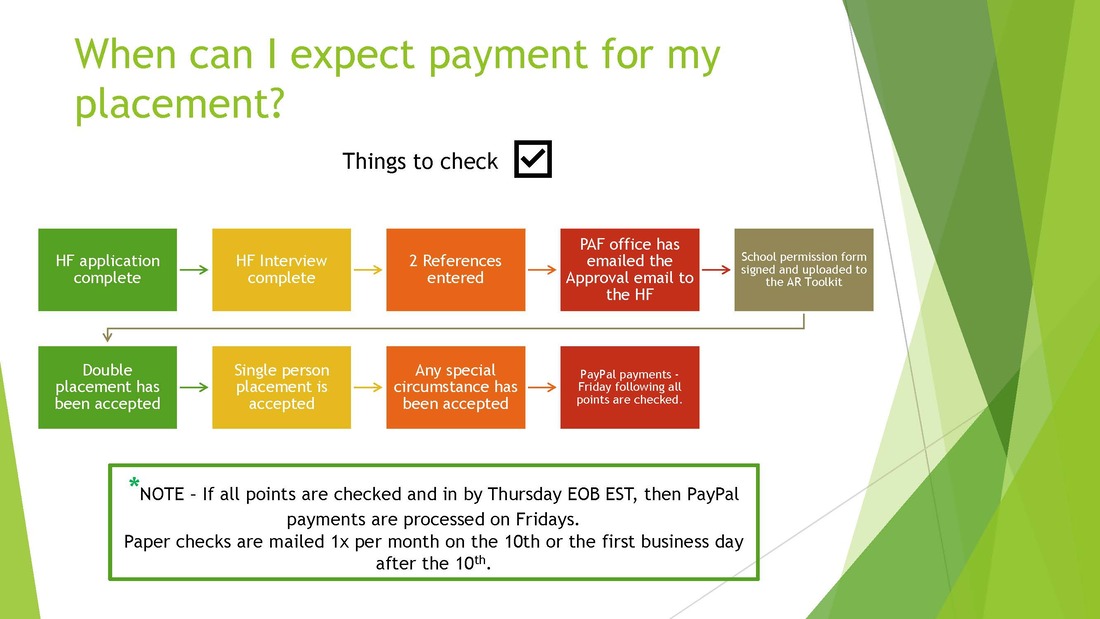
1.  Vetting Payments are "ready to pay" once the host family is approved and the HFO is completed.   Do not pay vetting until HFO is completed. 
2. Placement Payment s are  "ready to pay"  once the HFO is complete , HSP is uploaded (see HSP date) and the HF DP paperwork is uploaded, if applicable.  

​Format:

When creating payment in Sugar, enter subject as follows:

Supervisory Fee: Laura Ann must enter   link here with instructions. Example:   
FUV: FUV  Name of Visitor (# of visits being paid  (put student ID’s and list family names in the payment notes)Example:    FUV Rasuch  (2)
Placement Fee: Student ID, Host Family last name, Placement Fee (do not put student name)Example: ABC00123 Whelan  Placement Fee
Vetting Fee: Student ID, Host Family last name, Vetting Fee (do not put student name)Example: ABC00123  Whelan Vetting Fee
State Request Fee: Student ID, Host Family last name, Additional Placement Fee, State RequestExample: ABC00123 Whelan  Additional Placement Fee  State Request
Regional Request Fee: Student ID, Host Family last name, Additional Placement Fee, Regional Request Example: ABC00123 Whelan Additional Placement Fee Regional Request
Assured Early Placement Fee: Student ID, Host Family last name, Additional Placement Fee Assured Early Placement Example:ABC00123 Whelan Additional Placement Fee  Assured Early Placement
Incentive Fee for one student:  Student ID, Host Family last name, Incentive Fee (put incentive description in payment notes)Example: ABC00123 Whelan Additional Placement Fee Incentive 
General Incentive Fee:  AR Last Name, Additional Placement Fee Incentive Fee Type (put incentive description in payment notes)Example: Burge Additional Placement Fee Dinner Incentive 
Expense:  AR Last Name, List type of expense , different types are different expense reports. Example: Whelan Expense Report  International Meeting  Munich

  1. Select corresponding payment type from the dropdown
    1. If a payment for an employee who is on payroll, select payment method as “payroll”.  Vickie will pay payroll payments in their paycheck.  

  1. Select Area Representative

  1. Enter payment amount.

  1. Click “Save” in the upper right-hand corner.

  1. Once you click save, Sugar will create a payment number. 

  1. If a check payment for an AR, Laura will pay these on the 10th of each month. Mark “Ready to pay”.  

  1. If a payment for an employee who is on payroll, select payment method as “payroll”.  Vickie will pay payroll payments in their paycheck.   Mark “Ready to pay”.

  1. If a paypal payment that can’t be paid as an automated payment, follow directions below:

  1. Any payment entered into paypal must be written as follows: Payment # (without words or characters), HS, Payment Subject (from list above in #4)
EXAMPLES:   20345 HS  FUV Rasuch  (2)
 
For FUV’s, please add the name of the visitor to the Paypal notes in paypal.
 
When written this way, we are able to sort transactions by number to see which are missing when compared with quick books.  Any character in the beginning of the paypal note other than the payment number will throw off the sorting. 
 
No Payment should be entered into Paypal without a HS payment number.
 
Payments must be made from the PAYPAL BALANCE, not the bank account.

  1. Incorrect or Unclaimed Payments:  When a payment is incorrect or unclaimed in Paypal, Sugar must reflect this.  Do not delete any payments.
  1. If a duplicate payment was made, change Sugar payment to 0.00 and explain the issue in payment notes.  Mark as PAID and the date.
  2. If the payment was for the wrong amount, make a new payment in Sugar with the adjusted amount, whether positive or negative. 
  3. If the payment was unclaimed in paypal and reissued, you CAN use the same sugar payment number when you resissue to the correct paypal account, just update the date the payment was made so matches Paypal, and explain in payment notes.  
Pan Atlantic Foundation • 1 Union Street, Suite 202 • Portland, Maine 04101 USA • Tel: 207-871-8622 • Fax: 207-772-4842
24 HOUR EMERGENCY #: 866-227-5335
Home
High School in America
Internships in America
About Pan Atlantic
Privacy Policy
Careers
Overseas Representative Toolkit
AR Toolkit
RD Toolkit
​
Ops Toolkit
​Student Handbook
  • Home
  • About Us
  • Careers
    • Area Representative
  • Meet our Students
  • High School in America
    • Partnering Schools
    • Current Students
    • Student Orientation
    • Federally Funded Programs
    • New Students >
      • Apply Now
  • Internships in America
  • Area Representative Toolkit
    • AR Portal
    • Announcements
    • Area Representative Training >
      • AR Refresher Training
      • Payments
    • Student Profiles
    • Placements
    • School and Community Outreach
    • Resources and Support
    • Supervision
    • FLEX & YES Programs >
      • FLEX and YES Area Rep Training
      • FLEX and YES Refresher Training
  • Host Family Toolkit
  • Overseas Representative Toolkit
  • Host Family Highlights